
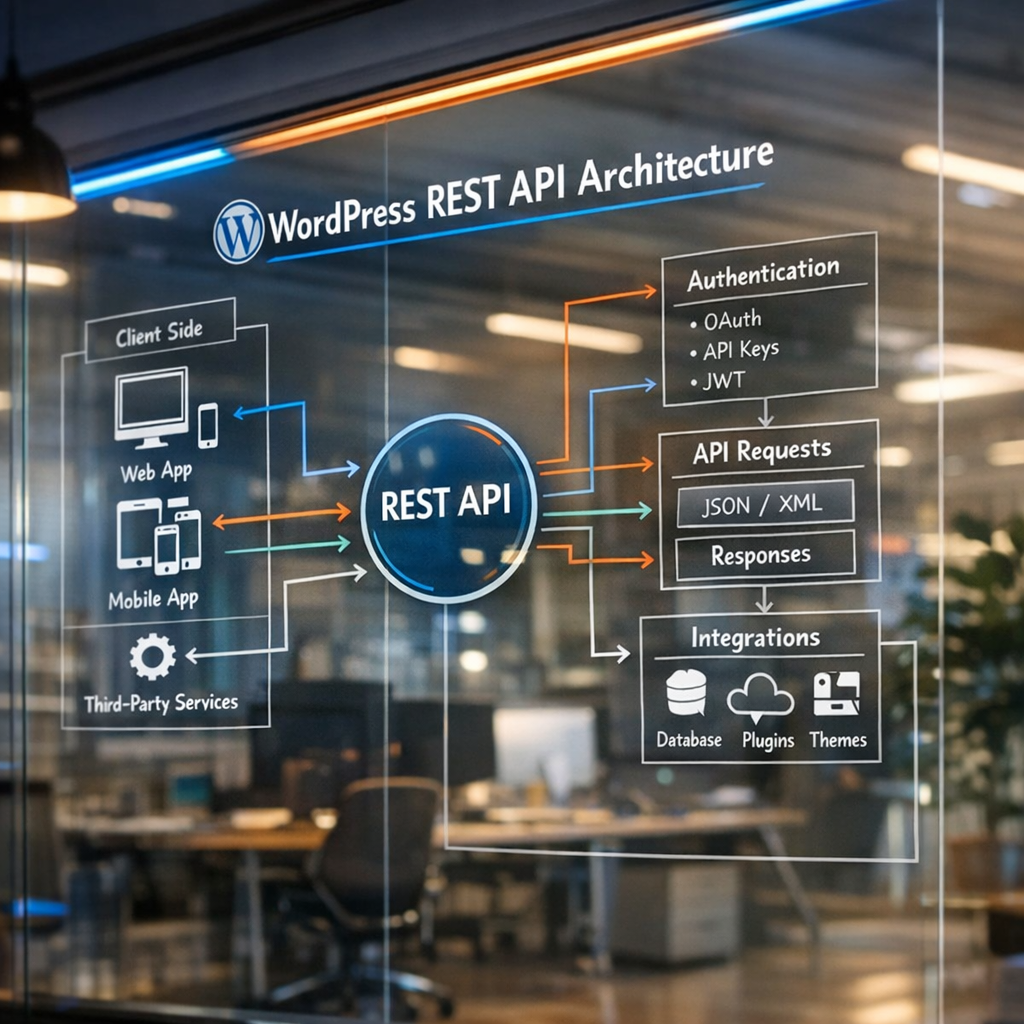
WordPress REST API Architecture powers modern decoupling strategies, transforming the monolithic CMS into a high-speed, JSON-driven headless backend. At Coderxa, we recently audited a high-traffic media publisher whose core database was buckling under 45 requests per second of unoptimized GET queries. By overhauling their custom endpoints, enforcing strict schema validation, routing authentication through JWT, and caching payloads in Redis, we slashed server CPU utilization by 74% and accelerated bot crawl rates. Here is how we build bulletproof API infrastructures.
Implementing a scalable API layer requires looking past standard post-type endpoints. When dealing with complex enterprise datasets, out-of-the-box routing introduces significant database overhead and security vulnerabilities. We need explicit controller classes, fine-tuned permission callbacks, and robust memory management.
This technical guide details our battle-tested methodology for engineering enterprise-grade WordPress REST API Architecture. Let’s dive straight into the implementation patterns that keep production servers stable under heavy loads.
1What is WordPress REST API Architecture?
WordPress REST API Architecture is a structural design framework enabling client-side applications to interact with a WordPress database via HTTP requests, utilizing JSON-formatted endpoints, object-oriented controllers, schema validation rules, and stateless authentication tokens for high-performance decoupled integrations.
2Custom REST Controllers and Schema Validation
When extending core endpoints, procedural function calls inside functions.php quickly become unmaintainable. We structure our custom endpoints by extending WP_REST_Controller . This object-oriented approach enforces clean separation of concerns for routing, permission checks, request handling, and schema definitions.
Schema validation is your first line of defense against malformed payloads and injection vectors. By defining an explicit schema array within your controller, WordPress automatically sanitizes and validates incoming parameters before your callback ever executes. If a client sends an invalid integer or an improperly formatted email address, the API immediately throws a 400 Bad Request response without touching the database.
<?php
class Coderxa_Custom_Products_Controller extends WP_REST_Controller {
public function __construct() {
$this->namespace = ‘coderxa/v1’;
$this->rest_base = ‘products’;
}
Public function register_routes() {
register_rest_route( $this->namespace, ‘/’ . $this->rest_base, array(
array(
‘methods’ => WP_REST_Server::READABLE,
‘callback’ => array( $this, ‘get_items’ ),
‘permission_callback’ => array( $this, ‘get_items_permissions_check’ ),
‘args’ => $this->get_collection_params(),
),
array(
‘methods’ => WP_REST_Server::CREATABLE,
‘callback’ => array( $this, ‘create_item’ ),
‘permission_callback’ => array( $this, ‘create_item_permissions_check’ ),
‘args’ => $this->get_endpoint_args_for_item_schema( WP_REST_Server::CREATABLE ),
),
) );
}
public function get_item_schema() {
if ( $this->schema ) {
return $this->add_additional_fields_schema( $this->schema );
}
$schema = array(
‘$schema’ => ‘http://json-schema.org/draft-04/schema#’,
‘title’ => ‘product’,
‘type’ => ‘object’,
‘properties’ => array(
‘title’ => array(
‘type’ => ‘string’,
‘description’ => ‘The title of the product.’,
‘required’ => true,
‘sanitize_callback’ => ‘sanitize_text_field’,
),
‘price’ => array(
‘type’ => ‘number’,
‘description’ => ‘Product pricing in USD.’,
‘required’ => true,
‘minimum’ => 0,
),
),
);
$this->schema = $schema;
return $this->add_additional_fields_schema( $this->schema );
}
}
JWT Authentication and Batch Request Handling
Default cookie-based authentication fails in decoupled architectures where your frontend resides on Next.js or Nuxt. Relying on application passwords for every microservice call creates overhead.
Instead, we implement JSON Web Tokens (JWT) using robust libraries like firebase/php-jwt . When a user authenticates, a signed token is issued with a strict expiration window. Subsequent requests pass this token inside the HTTP Authorization header.
Another common bottleneck in headless builds is the N+1 request problem, where a client fires dozens of individual REST calls to render a single dashboard view. To solve this, we implement batch request processing via the /wp-json/batch/v1 endpoint pattern. This allows frontends to bundle multiple requests into a single HTTP POST payload, executing internal sub-requests sequentially while maintaining a single TCP connection.
# Example cURL request verifying JWT token validation on a custom endpoint
curl -X GET “https://example.com/wp-json/coderxa/v1/products”
-H “Authorization: Bearer eyJhbGciOiJIUzI1NiIsInR5cCI6IkpXVCJ9…”
-H “Content-Type: application/json”
Step-by-Step Implementation Blueprint
Deploying a performant API layer demands a structured, methodical engineering rollout. At Coderxa, we follow a 4-phase deployment blueprint to guarantee stability during production transitions.
Phase 1: Architecture Audit & Endpoint Mapping
Analyze existing database queries using Query Monitor. Map out required headless endpoints, stripping away unnecessary metadata fields to reduce JSON payload sizes by up to 50%.
Phase 2: Controller & Schema Development
Build custom controllers extending WP_REST_Controller . Implement strict input validation and sanitization rules adhering to Official WordPress Core Documentation standards.
Phase 3: Redis Caching & Transport Optimization
Integrate Redis object caching to store serialized JSON responses. Optimize network transmission headers according to MDN Web Docs Performance Engineering Guide benchmarks.
Phase 4: Load Testing & Telemetry Monitoring
Execute concurrent load tests using Apache Bench or k6. Monitor TTFB, memory spikes, and slow query logs before routing production traffic.
3Measurable Performance & Latency Gains in WordPress REST API Architecture
The following metrics highlight the operational difference between unoptimized REST setups and a properly architected, cached WordPress REST API Architecture implementation.
4Professional Engineering Advisory for WordPress REST API Architecture
Architecting a high-throughput API layer requires specialized backend expertise. At Coderxa, our engineering teams build custom enterprise applications designed to scale cleanly without sacrificing security or maintainability.
Explore our core engineering capabilities via WordPress Engineering Services, learn more about our engineering philosophy on the About coderxa page, or schedule a direct architectural audit through our Expert Technical Consultation portal.
5Edge-Case Pitfalls in WordPress REST API Architecture Deployments
Even experienced developers stumble when scaling API infrastructure. Avoiding these three critical mistakes will save your engineering team hours of debugging:
1. Neglecting Permission Callbacks
Leaving permission callbacks set to __return_true on endpoints handling sensitive user data exposes your database to anonymous read/write exploits. Always implement granular capability checks.
2. Forgetting to Cache Serialized Responses
Allowing every REST request to trigger full PHP execution and database queries will instantly exhaust server memory. Store JSON payloads in Redis with intelligent cache invalidation hooks tied to save_post.
3. Over-fetching Payload Data
Returning entire post objects when a frontend only needs title and thumbnail strings inflates payload sizes. Use field filtering parameters to keep network transfers lightweight.
6Technical FAQs for WordPress REST API Architecture
How do I secure custom WordPress REST API endpoints against unauthorized access?
You should secure endpoints by utilizing strict permission callbacks inside your routing configuration, validating user capabilities with functions like current_user_can(), and authenticating requests via stateless JWT tokens.
Can I use Redis to cache WordPress REST API responses?
Yes. By leveraging object caching plugins combined with custom transient storage or Redis persistence layers, serialized JSON responses for public endpoints can be served directly from memory, bypassing MySQL entirely.
What is the advantage of extending WP_REST_Controller over procedural functions?
Extending WP_REST_Controller provides a standardized, object-oriented framework that automatically structures routing, input schema validation, permission checks, and response formatting according to core WordPress best practices.
How does schema parameter validation prevent SQL injection attacks?
Schema validation inspects incoming request data against defined types, formats, and sanitization callbacks before processing. Invalid payloads are rejected instantly with a 400 error, preventing malicious input from reaching database queries.
7Scaling WordPress REST API Architecture: Strategic Action Plan
Mastering WordPress REST API Architecture allows engineering teams to build lightning-fast, secure, and infinitely scalable decoupled applications. By replacing procedural scripts with robust object-oriented controllers, enforcing strict schema validation, utilizing JWT authentication, and caching responses in Redis, you eliminate server bottlenecks and boost organic crawl efficiency.
If your enterprise infrastructure is struggling with high server latency, sluggish API response times, or heavy database loads, partner with the experts. Contact Coderxa today to schedule a comprehensive technical architecture review and future-proof your digital ecosystem.
Join the Conversation 2
Share your thoughts, questions or experience. We read every comment.