
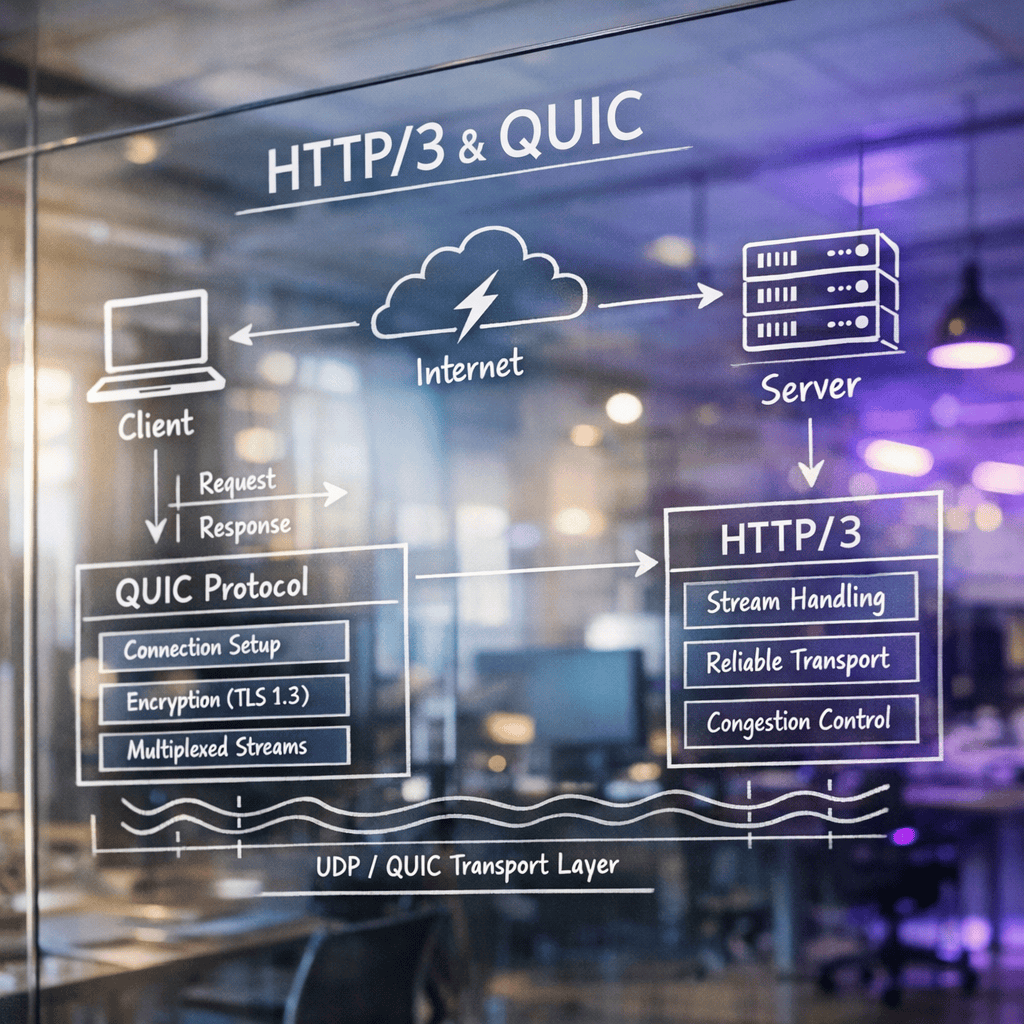
HTTP/3 and QUIC for WordPress represents the most fundamental shift in transport layer networking since TCP was standardized decades ago. Last month, while auditing a high-traffic e-commerce publisher at Coderxa, we noticed a persistent wall in mobile Core Web Vitals. Despite a finely tuned Redis object cache and a globally distributed edge CDN, mobile users on high-latency 4G networks experienced erratic Largest Contentful Paint (LCP) spikes. The culprit wasn’t PHP execution time or unoptimized database queries; it was the persistent serialization overhead of TCP head-of-line blocking.
When we deploy HTTP/3 and QUIC for WordPress, we swap the reliable, connection-heavy constraints of Transmission Control Protocol for a multiplexed, UDP-based protocol engineered for modern, packet-loss-prone wireless networks. For high-throughput enterprise WordPress sites, this transition eliminates handshake delays and stabilizes performance metrics that directly impact organic search visibility and user conversion rates.
This technical guide pulls back the curtain on how we configure, tune, and troubleshoot HTTP/3 and QUIC for WordPress across production infrastructure. Whether you’re managing a sprawling WooCommerce multisite or a high-concurrency content platform, understanding the nuances of UDP packet management, Alt-Svc headers, and firewall rules is critical to modern systems engineering.
1What is HTTP/3 and QUIC for WordPress?
HTTP/3 and QUIC for WordPress is a modern network protocol implementation that replaces TCP with UDP-based transport, eliminating head-of-line blocking and accelerating connection handshakes. This architecture drastically reduces Time to First Byte (TTFB) and stabilizes mobile asset delivery for high-concurrency publishing environments.
2Transitioning from TCP to UDP-Based QUIC
For over twenty years, the LAMP stack and its modern offshoots have relied exclusively on TCP. While TCP guarantees ordered packet delivery, it introduces a severe bottleneck known as head-of-line blocking. If a single packet drops in a TCP stream, the entire connection stalls until that packet is retransmitted. On mobile networks with high jitter, this design compromises WordPress rendering performance.
QUIC (Quick UDP Internet Connections) abandons TCP entirely in favor of UDP. Because UDP is connectionless and lightweight, QUIC manages its own stream multiplexing and reliability at the application transport layer. When a packet drops on stream three, streams one, two, and four continue executing without interruption. This architectural difference is critical for WordPress sites loaded with dozens of render-blocking JavaScript files, CSS sheets, and REST API calls.
Furthermore, QUIC integrates TLS 1.3 directly into its cryptographic handshake. By combining transport and security handshakes, the protocol achieves 0-RTT (Zero Round-Trip Time) session resumption. Returning visitors to your WordPress platform can send encrypted application data on the very first packet exchange, slashing connection establishment latencies down to near-zero.
3OpenLiteSpeed & Nginx UDP 443 Firewall Setup
Deploying HTTP/3 and QUIC for WordPress requires configuring your edge servers to listen on UDP port 443 alongside TCP port 443. Many standard server configurations block inbound UDP traffic by default, assuming UDP is only used for DNS or streaming media.
If you run an Nginx-backed WordPress cluster, you’ll need a modern build linked against BoringSSL or OpenSSL 3.x with QUIC support enabled. Here is a production-tested server block configuration for handling HTTP/3 traffic:
Server {
listen 443 ssl http2;
listen 443 quic reuseport;
server_name example.com www.example.com;
Ssl_certificate /etc/letsencrypt/live/example.com/fullchain.pem;
ssl_certificate_key /etc/letsencrypt/live/example.com/privkey.pem;
ssl_protocols TLSv1.3;
# Inform clients that HTTP/3 is available
add_header Alt-Svc ‘h3=”:443″; ma=86400’;
add_header X-Frame-Options “SAMEORIGIN” always;
root /var/www/html;
index index.php;
location / {
try_files $uri $uri/ /index.php?$args;
}
location ~ .php$ {
include snippets/fastcgi-php.conf;
fastcgi_pass unix:/run/php/php8.2-fpm.sock;
}
}
Crucially, notice the `Alt-Svc` response header. This header instructs compatible browsers that your WordPress origin or reverse proxy supports HTTP/3 on port 443, enabling seamless protocol negotiation on subsequent visits.
If you’re utilizing OpenLiteSpeed, QUIC is managed via the WebAdmin console under listener configurations, where you must explicitly bind UDP port 443 and verify that your cloud provider’s security groups (AWS Security Groups, GCP Firewall Rules, or UFW) permit incoming UDP traffic.
4Step-by-Step HTTP/3 and QUIC for WordPress Implementation Blueprint
Deploying HTTP/3 and QUIC for WordPress across production infrastructure requires a methodical, staged approach to avoid breaking SSL handshakes or causing fallback loops. Follow this field-tested engineering blueprint:
- Infrastructure Audit: Audit your current web server binaries (Nginx, OpenLiteSpeed, or Apache) and verify TLS library compatibility for QUIC transport parameters. Review the MDN Web Docs Performance Engineering Guide for deep dives into client-side transport metrics.
- Firewall & Network Configuration: Open UDP port 443 on all upstream firewalls, load balancers, and cloud security groups. Ensure connection tracking tables are large enough to handle UDP state bursts.
- Edge & Origin Deployment: Configure your reverse proxy or origin server to respond with proper `Alt-Svc` headers. Validate TLS 1.3 enforcement; QUIC does not support legacy TLS 1.2 ciphers.
- Core & Plugin Validation: Test WordPress REST API endpoints, WooCommerce cart fragments, and admin AJAX requests over HTTP/3. Consult the Official WordPress Core Documentation to ensure caching plugins handle Alt-Svc header caching correctly without breaking dynamic nonces.
- Telemetry & Monitoring: Monitor browser developer tools and synthetic testing suites (WebPageTest, Chrome UX Report) to verify protocol negotiation shifts from `h2` to `h3`.
5Expert Support & Enterprise Consulting for HTTP/3 and QUIC for WordPress
Configuring network protocols at the transport layer requires deep systems engineering expertise to prevent downtime and security vulnerabilities. At Coderxa, we specialize in high-performance infrastructure design for enterprise publishing and e-commerce platforms. If your team requires hands-on assistance, explore our tailored WordPress Engineering Services , learn more About coderxa , or book an Expert Technical Consultation to audit your network stack today.
6Common HTTP/3 and QUIC for WordPress Mistakes & Troubleshooting
When engineering teams adopt HTTP/3 and QUIC for WordPress, they frequently run into specific configuration traps that undermine performance gains. Watch out for these three critical mistakes:
- Ignoring Upstream UDP Rate Limiting: Many cloud providers and hardware firewalls apply aggressive rate limiting or outright blocking to incoming UDP traffic as a DDoS mitigation measure. If your server log shows clients failing to negotiate `h3` and silently falling back to HTTP/2, check your firewall rule sets for UDP packet drops on port 443.
- Misconfigured Alt-Svc Headers on CDN Edges: If you cache responses at the CDN level without varying or stripping the `Alt-Svc` header correctly, users behind proxies may receive conflicting routing instructions. Ensure your edge CDN provider natively supports HTTP/3 origination to the client while handling origin shields correctly.
- Forgetting Session Ticket Keys: In distributed multi-node WordPress clusters, 0-RTT session resumption will fail if requests hit different backend nodes that lack synchronized TLS session ticket encryption keys. Ensure your load balancer shares session state or routes returning QUIC connection IDs to the originating server worker.
7Frequently Asked Questions About HTTP/3 and QUIC for WordPress
Does WordPress core natively support HTTP/3 and QUIC?
WordPress core operates at the PHP application layer and is agnostic to underlying transport protocols. HTTP/3 and QUIC are handled entirely by your web server (such as Nginx or OpenLiteSpeed) and your reverse proxy or CDN edge. WordPress simply benefits from the drastically reduced latency and improved packet delivery.
Will enabling QUIC break existing SSL certificates?
No. QUIC utilizes TLS 1.3 for its cryptographic handshake, meaning your existing SSL certificates (such as Let’s Encrypt or commercial wildcard certificates) remain fully compatible. However, you must ensure your server software supports TLS 1.3 ciphers, as QUIC does not support legacy TLS 1.2 configurations.
How can I verify if my WordPress site is actively serving HTTP/3?
You can verify protocol delivery by opening Google Chrome Developer Tools, navigating to the Network tab, right-clicking the column headers, and selecting “Protocol”. When HTTP/3 and QUIC are functioning correctly, you will see `h3` listed alongside your site assets. Alternatively, online testing tools like HTTP3Check provide instant protocol audits.
What happens if a user’s network blocks UDP port 443?
QUIC is designed with graceful degradation in mind. If a corporate firewall or restrictive network blocks UDP traffic on port 443, the client browser automatically falls back to TCP-based HTTP/2 or HTTP/1.1 without interrupting the user experience or causing broken site rendering.
8Conclusion & Strategic HTTP/3 and QUIC for WordPress Roadmap
Modern web engineering demands infrastructure that adapts to the realities of wireless mobile networks and high-concurrency user demands. Implementing HTTP/3 and QUIC for WordPress moves your platform beyond the frustrating limitations of TCP head-of-line blocking, delivering lightning-fast TTFB, rock-solid Core Web Vitals, and improved search engine crawl efficiency.
If you’re ready to modernize your enterprise architecture and eliminate performance bottlenecks, let Coderxa engineer a robust, high-availability network stack tailored for your growth.
Discover our specialized engineering services at WordPress Engineering Services, learn more About coderxa, or schedule an Expert Technical Consultation today.
Join the Conversation 5
Share your thoughts, questions or experience. We read every comment.